Quick Answer: Figma AI is a powerful set of artificial intelligence features built directly into Figma — the world’s most popular design tool. In 2026, Figma AI covers everything from generating full UI layouts from text prompts to AI image editing, auto-renaming layers, code generation, and building interactive websites. Moreover, paid plans include AI features at no extra cost, though a credit system applies for heavy usage. For professional design teams, the productivity gains are genuinely impressive. For solo designers on a tight budget, however, the credit limits need careful monitoring.
Figma AI 2026: Every Feature, Honest Verdict, and Is It Actually Worth It?
Updated: June 2026 | 14 min read | Toolszai Editorial Team — Tested on Professional Plan
Not long ago, Figma was simply a design tool. A very good one — but still just a tool for placing boxes and text on a canvas. Today, however, that description feels almost quaint.
In 2026, Figma has quietly transformed into something far more ambitious: a full AI-powered product design ecosystem. It generates UI layouts from a single sentence, edits images, renames layers, writes copy, builds interactive websites, and delivers production-ready code directly to developers — all without leaving the canvas.
But here is the honest question most people are not asking loudly enough: does it actually work on real projects? Or does it look impressive in demos and fall apart in practice?
To find out, we spent several weeks testing every Figma AI feature on real client work — not toy examples. As a result, this review gives you a clear picture of what works, what still needs improvement, and whether the pricing makes sense for your situation.
⭐ Toolszai Quick Verdict — Figma AI 2026
Overall Rating: 8.5 / 10
Best for: UI/UX designers, product teams, developers, freelancers, and design agencies
AI features included: ✅ Yes — on Professional, Organization, and Enterprise plans
Biggest strength: Figma Make, AI Agent, Code-to-Canvas, and image editing — all in one tool
Biggest limitation: The credit system adds up fast for heavy users. The free plan allows only 3 files and 500 credits per month.
Bottom line: The most complete AI design ecosystem available in 2026. If you already pay for Figma, you already have access to the most powerful AI design suite on the market.
What Is Figma AI? A Quick Overview
First of all, Figma AI is not a single feature. Instead, it is an entire suite of artificial intelligence capabilities embedded across Figma’s full product line. When designers talk about “Figma AI,” they usually refer to several different tools that all live under one roof.
The AI journey started at Config 2023, when Figma first previewed its AI ambitions. By 2024, the tools went live for general use. In 2025, Figma introduced the credit system. And in 2026, the company shipped what many designers consider its most transformative updates yet — including the Figma AI Agent, Code-to-Canvas, and a fully expanded version of Figma Make.
Today, the product suite spans eight tools: Figma Design, Dev Mode, FigJam, Figma Slides, Figma Sites, Figma Make, Figma Draw, and Figma Buzz. Furthermore, AI features run across all of them, powered by Gemini 3.0 Pro and OpenAI GPT Image models.
In plain English: Figma AI turns your design tool into an AI-assisted creative partner. You describe what you want, and Figma helps you build it — faster, cleaner, and with far less repetitive work.
Figma AI Key Features in 2026 — What Actually Works
1. Figma AI Agent — Generate UI From Text
This is the headline feature of 2026. Instead of starting from a blank canvas, you simply describe what you want to build in plain language. For example, typing “create a dashboard for a fitness app with a weekly step chart and a recent workouts list” prompts the AI Agent to generate a structured interface based on your request.
The output includes layout hierarchy, component placement, typography suggestions, responsive sections, and UX best practices. Additionally, when your file includes a proper design system, the AI uses your actual components and tokens — not generic placeholders. In our testing, the layout accuracy reached about 70%. Even when it missed, fixing the output was still faster than building from scratch.
2. Figma Make — From Prompt to Interactive Prototype
Figma Make goes a step further than simple layout generation. Specifically, it turns natural language prompts into responsive, interactive websites or apps — complete with animations, layout structure, and backend connections via Supabase. As a result, you can go from idea to working prototype without writing a single line of code manually.
For freelancers and agencies who need to show clients a working concept quickly, this feature is a genuine game-changer. While it does not produce production-ready output, no other rapid prototyping tool on the market comes close right now.
3. Code-to-Canvas — Designers and Developers Finally in Sync
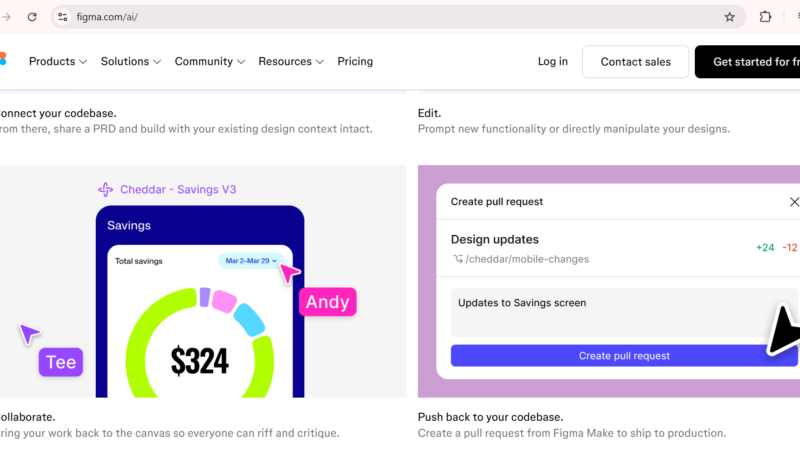
One of the most practical new features of 2026 is Code-to-Canvas. A designer creates a component, the AI generates production-ready code in the connected IDE, and the developer reviews and ships it — nearly eliminating the manual translation step between design and development.
Moreover, Figma’s MCP Server now allows AI coding tools like Claude, Cursor, and GitHub Copilot to access your design context directly. Engineering teams have been waiting for this kind of integration for years.
4. AI Image Editing — No More Photoshop Switching
Figma AI now handles a full range of image editing tasks directly on the canvas. For instance, you can remove backgrounds, isolate objects, expand images, boost resolution, vectorize raster images, and generate new images from text prompts — all without opening an external tool.
Furthermore, image generation runs on both Gemini 3.0 Pro and OpenAI GPT Image models, giving you multiple style options. For web designers working on hero sections, product showcases, and marketing banners, this feature alone saves significant time every week.
5. Auto-Rename Layers — The Unglamorous Time-Saver
Renaming layers is one of the most tedious parts of UI design. Anyone who has inherited a Figma file full of “Frame 47” and “Rectangle 12” layers knows exactly how frustrating it is. Fortunately, Figma AI now renames layers automatically based on their content and context — and in our testing, the accuracy was surprisingly high.
It is not the flashiest feature on this list. Nevertheless, across a full week of design work, the time it saves adds up noticeably.
6. Design System Intelligence — Keep Everything Consistent
The new Design System Intelligence feature detects visual inconsistencies automatically — elements that are slightly misaligned, spacing that does not match your 8px grid, and font sizes that break your type scale. These suggestions appear in a review panel, and you can accept or dismiss them individually.
Think of it as a design linter running quietly in the background. In particular, it catches the small errors that designers easily miss after staring at the same file for several hours.
7. Figma Buzz — Marketing Assets at Scale
Figma Buzz targets marketing teams who need to produce large volumes of branded assets quickly. It offers bulk editing, AI-assisted content generation, automated resizing, and multi-platform publishing. As a result, teams can create dozens — or even hundreds — of asset variations without sacrificing brand consistency.
8. FigJam AI — Smarter Brainstorming
FigJam’s AI features help teams organize sticky notes, generate diagrams from descriptions, and automatically sort ideas during brainstorming sessions. For distributed teams running workshops and sprint planning, this makes collaborative sessions noticeably more productive.
Figma AI Pricing 2026 — What Does It Cost?
Figma’s pricing structure changed significantly in March 2025 with the introduction of three seat types. Therefore, understanding this structure is important before you commit to a plan.
| Plan | Price | AI Credits/Month | Key Features |
|---|---|---|---|
| Starter (Free) | $0 | 500/month (150/day) | 3 design files, unlimited drafts, unlimited FigJam, basic AI |
| Professional | $15/month per seat | Higher limits per seat | Unlimited files, full AI suite, Dev Mode, branching, analytics |
| Organization | $45/month per seat | Highest limits | SSO, advanced admin, centralized design systems, usage analytics |
| Enterprise | Custom | Custom | AI credit API, workspace controls, dedicated support |
The Credit System — What You Need to Know Before You Upgrade
Every AI action in Figma consumes credits. Basic features like background removal carry fixed credit costs. More advanced features like Figma Make, however, carry variable costs — a complex multi-screen generation consumes significantly more credits than a simple single-screen prompt.
Credits reset monthly and each seat holds its own allocation. Importantly, you cannot accumulate, share, or transfer credits between seats. Starting March 18, 2026, Figma began strictly enforcing these credit limits for full seats on paid plans. If you run out, add-on credit packs are available for purchase.
For most professional designers, the included credits are sufficient. For heavy Figma Make users or agencies running large-scale AI workflows, however, credit costs can add up quickly — so tracking your usage carefully matters.
Figma AI: How Does It Actually Perform?
| Category | Score | Notes |
|---|---|---|
| AI feature quality | 8.5 / 10 | Figma Make and AI Agent genuinely impress on real projects |
| Ease of use | 7.8 / 10 | Powerful but the learning curve challenges new users |
| Value for money | 8.0 / 10 | AI comes included in paid plans — the credit system is the catch |
| Developer collaboration | 9.0 / 10 | Code-to-Canvas and MCP Server genuinely change the workflow |
| Image editing quality | 8.2 / 10 | Saves real time and cuts Photoshop dependency significantly |
| Output consistency | 7.0 / 10 | AI layouts achieve about 70% accuracy — human review still matters |
Figma AI Pros and Cons
| ✅ What Works Well | ❌ Where It Falls Short |
|---|---|
| AI comes included in paid plans — no extra subscription needed
Figma Make turns text prompts into interactive prototypes Code-to-Canvas closes the gap between designers and developers AI image editing cuts the need for Photoshop Gemini 3.0 Pro and OpenAI GPT Image power the generation tools MCP Server connects Claude, Cursor, and GitHub Copilot Design System Intelligence spots inconsistencies automatically Eight products sit under one roof — a complete ecosystem |
Heavy AI usage drives up credit costs quickly
AI layouts still need human review before production New users face a steep learning curve The free plan allows only 3 design files Credits do not carry over, share, or transfer between seats Generic-looking outputs appear without significant customization Figma requires a constant internet connection — no offline mode Three seat types make pricing more complex than it needs to be |
Figma AI vs Alternatives — Which AI Design Tool Wins in 2026?
Figma AI does not operate without competition. In fact, several strong alternatives are pushing hard in the AI design space this year. Here is how they compare honestly.
| Tool | Best For | Starting Price | How It Compares to Figma AI |
|---|---|---|---|
| Figma AI 🏆 | Professional UI/UX teams, full-stack design workflows | $15/month | Industry standard — the most complete AI design ecosystem available |
| Framer AI | Website publishing, marketing sites, animations | $10/month | Better for live website publishing, but not a full UI design tool |
| Canva AI | Non-designers, social media, marketing graphics | $15/month | Much easier for beginners, but it is not a professional UI design tool |
| Penpot | Budget-conscious teams, open-source fans | $0 — fully free | Completely free, but offers fewer AI features and a smaller plugin ecosystem |
| Adobe XD AI | Adobe Creative Cloud users | Included in CC | Usage has declined — most professional teams have already moved to Figma |
Who Should Use Figma AI in 2026?
Not everyone needs Figma AI — and being honest about that matters. So here is a clear breakdown based on who actually benefits most.
| If you are… | Figma AI is… | Why |
|---|---|---|
| A professional UI/UX designer | ✅ Essential | Clients expect Figma files — it is the industry standard |
| A product design team | ✅ Highly recommended | Code-to-Canvas and MCP Server close the designer-developer gap |
| A freelance designer | ✅ Worth it at $15/month | Figma Make speeds up client presentations significantly |
| A developer working with designers | ✅ Very useful | Dev Mode and MCP integration with Cursor and Copilot save hours |
| A marketing team | ✅ Figma Buzz is built for you | Bulk asset creation with consistent branding across platforms |
| A student or beginner designer | ⚠️ Start with the free plan | 500 credits per month gives you enough room to learn the AI features |
| A non-designer making social graphics | ❌ Use Canva instead | Figma’s learning curve is simply not worth it for basic graphics work |
Frequently Asked Questions
Is Figma AI free to use?
The free Starter plan includes 500 AI credits per month — 150 per day — which gives you enough room to explore the basic AI features. However, full access to the complete AI suite, including Figma Make, AI Agent, and Code-to-Canvas, requires a paid Professional plan starting at $15 per month per seat. Importantly, AI credits come included in paid plans at no additional cost, though heavy users may need to purchase add-on credit packs.
What is Figma Make and how does it work?
Figma Make is Figma’s AI-powered prototype builder. You describe what you want to build in plain English, and it generates a responsive, interactive website or app complete with layout, animations, and backend connections via Supabase. While the output is not production-ready code, it works extremely well as a rapid prototyping tool for client presentations and early-stage concepts.
How does the Figma AI credit system work?
Every AI action in Figma consumes credits. Basic features like background removal carry fixed credit costs, while more advanced features like Figma Make carry variable costs depending on complexity. Credits reset monthly, each seat holds its own allocation, and you cannot accumulate or share credits across seats. If you run out, add-on credit packs are available for purchase.
Is Figma AI better than Canva AI?
They serve very different audiences. Figma AI targets professional UI/UX designers, product teams, and developers who need advanced design systems, prototyping, and developer handoff. Canva AI, on the other hand, targets non-designers who need social media graphics and marketing materials quickly. For designing real digital products and interfaces, Figma AI is clearly the stronger choice. For everyday marketing content, Canva is far easier and more appropriate.
Can Figma AI generate code for developers?
Yes — through Dev Mode and the Code-to-Canvas feature. Figma AI generates CSS, iOS, and Android code for selected design elements. Additionally, the Figma MCP Server integrates directly with developer tools like Claude, Cursor, and GitHub Copilot, allowing developers to access design context without leaving their IDE. That said, always review AI-generated code before pushing it to production — treat it as a starting point, not a finished output.
What is the Figma AI Agent?
Figma announced the AI Agent at Config 2026. It generates full UI interfaces from natural language prompts, including layout hierarchy, component placement, typography suggestions, and responsive sections — all using your existing design system as the foundation. While it does not replace strategic design thinking, it dramatically reduces the time designers spend on early-stage layout work.
Does Figma AI work offline?
No — Figma is a browser-based platform that requires a constant internet connection for all features, including all AI capabilities. Designs store in the cloud and sync in real time across team members. Currently, Figma offers no offline mode.
Final Verdict — Is Figma AI Worth It in 2026?
Here is the honest answer: if you already pay for Figma at the Professional level or above, you already have access to the most powerful AI design suite available anywhere today. The real question is not whether to pay for it — it is whether you are actually using what you are already paying for.
For professional design teams, the productivity gains are real and measurable. Figma Make speeds up client presentations noticeably. Code-to-Canvas reduces the back-and-forth between design and engineering. AI image editing cuts Photoshop dependency. And auto-rename layers alone saves hours across a busy month. These are not demo features — they work consistently on real projects.
The limitations, however, are equally real. AI-generated layouts still need human review before anyone ships them. The credit system adds cost complexity for heavy users. The learning curve is steeper than tools like Canva. And for non-designers who simply need quick social media graphics, the entire experience can feel unnecessarily overwhelming.
Nevertheless, for anyone who designs digital products professionally — Figma AI in 2026 is not optional. It is the new baseline for how serious design work happens.
✅ Toolszai Final Verdict — Figma AI: 8.5 / 10
Recommended for: UI/UX designers, product teams, freelance designers, developers working with design files, and marketing teams who need brand-consistent assets at scale.
Not ideal for: Non-designers needing simple social media graphics (use Canva), budget-constrained solo designers who only need basic mockups (try Penpot free), or teams without a design system already in place.
Bottom line: If you already pay for Figma — start using the AI features today. If you are evaluating Figma for the first time — the Professional plan at $15/month gives you the most complete AI design ecosystem in the industry right now.