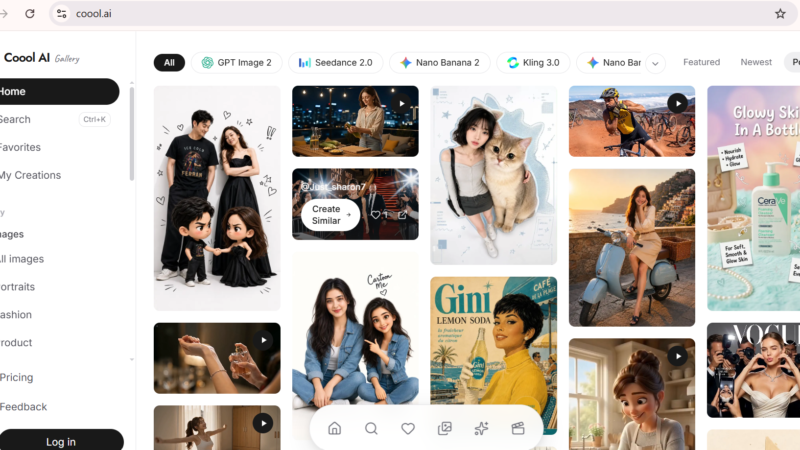
Quick Answer: Coool.ai is a free AI prompt gallery and image generation platform that gives visual creators access to over 15 of the world’s most powerful AI models including GPT Image 2, Midjourney 8.1, Seedance 2.0, Veo 3.1, Kling 3.0, Flux 2 Pro, Nano Banana 2, and more all through a single, clean interface. Instead of managing separate subscriptions to each AI model, Coool.ai lets you browse thousands of community-created prompts, remix the ones you like, and generate images or videos directly. The core gallery is free to explore. Image and video generation uses a credit system. For content creators, marketers, and designers who want to experiment with multiple cutting-edge AI models without commitment, Coool.ai is one of the most practical tools available in 2026.
Coool.ai Review 2026: The AI Prompt Gallery That Gives You 15+ Models in One Place
Updated: July 2026 | 10 min read | Toolszai Editorial Team — Tested hands-on
Here is a problem every visual creator knows: the best AI image and video models are scattered across different platforms. Midjourney lives on Discord and its own web app. GPT Image 2 lives inside ChatGPT. Veo 3.1 requires a Google subscription. Kling 3.0 has its own sign-up. Getting access to all of them means managing five different accounts, five different interfaces, and five different billing systems.
Coool.ai takes a different approach. It pulls 15+ of the most capable AI models into a single gallery interface and adds something genuinely useful on top: a browsable, remixable library of thousands of community prompts that you can study, adapt, and generate from directly.
For creators who spend time trying to figure out what prompts actually produce good results, that library alone saves hours. We tested Coool.ai hands-on across image generation, video generation, and the prompt discovery workflow. Here is the complete, honest verdict.
⭐ Toolszai Quick Verdict Coool.ai 2026
Overall Rating: 8.0 / 10
Best for: Content creators, marketers, designers, and AI enthusiasts who want multi-model access and a community prompt library in one place
Free plan: Yes, gallery browsing and limited generation free
Generation: Credit-based system for images and videos
Models available: 15+ including GPT Image 2, Midjourney 8.1, Seedance 2.0, Veo 3.1, Kling 3.0, Flux 2 Pro, Wan 2.7, Runway Gen-4
Biggest strength: 15+ top AI models in one interface + community prompt library to inspire and learn from
Biggest limitation: New platform smaller community than established tools. Credit costs for premium models add up fast.
Bottom line: The most practical multi-model AI creative hub available for free in 2026. If you use more than one AI image or video tool regularly, Coool.ai is worth bookmarking immediately.
What Is Coool.ai? A Simple Overview
Coool.ai is an AI prompt gallery and multi-model image and video generation platform built specifically for visual creators. The platform describes itself as a remixable AI prompt gallery for daily image and video work where you find curated ideas and then use a “Use Idea” button to generate in one flow.
Rather than building its own proprietary AI model, Coool.ai functions as an aggregator bringing the world’s best image and video generation models together under one roof, paired with a community library of prompts that show you exactly what each model can produce and how to prompt it effectively.
The “Use Idea” workflow is the core innovation. You browse the gallery, find a generated image or video you admire, click “Use Idea,” and the original prompt loads into the generator with the same model pre-selected. From there, you modify the prompt to fit your needs and generate your own version. This removes the biggest barrier to AI image generation for most people not the tool itself, but not knowing what to type.
In plain English: Browse thousands of AI-generated images and videos. Click on one you like. See the exact prompt that created it. Remix it, adjust it, generate your own version using the same model or a different one. All in one place, without switching tabs or platforms.
Coool.ai Key Features in 2026 What Actually Works
15+ AI Models in One Interface
This is Coool.ai’s defining feature in 2026. The platform gives access to GPT Image 2, Seedance 2.0, Nano Banana 2, Kling 3.0, Nano Banana Pro, Midjourney 8.1, Veo 3.1, Flux 2 Pro, MiniMax H3, Wan 2.7, Seedream 5.0 Pro, Runway Gen-4, Grok Imagine, HappyHorse 1.1, and Grok Imagine Video all from one dashboard.
The practical implication is significant. Instead of maintaining separate subscriptions and interfaces for each model, you switch between them with a single click inside Coool.ai. For creators who use different models for different tasks — Midjourney 8.1 for artistic quality, GPT Image 2 for text-in-images, Veo 3.1 for video, Flux 2 Pro for photorealism this consolidation removes the workflow friction that makes multi-model workflows tedious in practice.
AI Prompt Gallery Browse, Learn, and Remix
The gallery is where Coool.ai genuinely earns its place in a creator’s toolkit. Thousands of community-contributed prompts are organized by model, style, and content category covering fashion, cinematic scenes, product photography, UGC ads, character stories, food, travel, and more. Each gallery entry shows the generated output alongside the full prompt that created it.
For creators who struggle with prompt writing which is most people this library is an education in what actually works, organized by the best real outputs the community has produced. Furthermore, the “Image to Prompt” feature runs the reverse process: upload any image you admire and Coool.ai generates a prompt description of it, giving you a starting point for replicating that aesthetic.
Video Gallery – Organized by Content Type
The video section organizes content by category including UGC Ads, Product Demo, Cinematic, Fashion and Beauty, Character Stories, Lifestyle, Food, Travel and Aerial, Brand Commercial, and Fantasy and Game. For marketers and video creators who need inspiration by content format rather than aesthetic style, this organization makes finding relevant examples fast and practical.
Moreover, the same “Use Idea” workflow applies to videos browse a video prompt you like, click to load it into the generator with the original model selected, modify as needed, and generate. The friction between inspiration and execution has rarely been smaller in any AI creative tool.
Built-In Image Generator With Multi-Model Switching
The image generator sits at the top of the interface and lets you switch between all available models without leaving the page. You write a prompt, select a model, choose your aspect ratio and resolution, and generate all in the same workflow. The prompt enhancement feature automatically improves your initial description before sending it to the model, which noticeably improves first-attempt results for users who are not yet experienced prompt writers.
Additionally, the translate prompt feature converts prompts written in any language into optimized English before generation useful for non-English speakers who want to use their native language to describe what they want without losing prompt quality in translation.
Favorites and Creations – Personal Library
Every image and prompt you generate saves to your personal Creations library. Any community prompt you want to return to saves to Favorites. Over time, these two collections build into a personalized reference library your best generations alongside the community prompts that have proved most useful for your specific workflow. For creators who produce content regularly, this personal library becomes genuinely valuable as it grows.
Image-to-Prompt Reverse Engineering
Upload any image to Coool.ai and the platform analyzes it and generates a text prompt that describes it so you can replicate the style, lighting, composition, or aesthetic in your own generations. For designers and creators who draw inspiration from existing imagery and want to apply similar styles to their own content, this reverse-engineering feature removes the guesswork from translating visual inspiration into AI prompts.
Coool.ai Pricing 2026 – What Does It Cost?
Browsing the Coool.ai gallery and exploring community prompts is completely free no account required. Image and video generation uses a credit system. Here is what the platform offers.
| Access Level | Cost | What You Get | Best For |
|---|---|---|---|
| Gallery Browse | $0 no account | Full gallery access, prompt viewing, model filtering | Research, inspiration, prompt learning |
| Free Account | $0 sign up | Limited generation credits, Favorites, Creations library | Testing generation quality before paying |
| Credit Top-Up | Pay-as-you-go | Credits for image and video generation across all models | Regular creators and content producers |
Credit costs vary by model and output quality. Standard image generation on models like Flux 2 Pro costs fewer credits per image than premium video generation on Veo 3.1 or Kling 3.0. The credit pricing is transparent within the interface each model shows its cost per generation before you commit.
For creators who only occasionally need AI generation, the free credits on sign-up provide a genuine first impression of multiple models. For daily users, the pay-as-you-go credit top-up avoids a forced subscription commitment you pay for what you actually use.
Coool.ai Review Honest Performance Ratings
These ratings reflect hands-on testing across prompt discovery, image generation, video browsing, and the overall creator workflow not the platform’s marketing page.
| Category | Score | Notes |
|---|---|---|
| Model variety | 9.5 / 10 | 15+ top models in one interface unmatched in free tools |
| Prompt gallery quality | 8.8 / 10 | High-quality community outputs excellent for learning and inspiration |
| Ease of use | 9.0 / 10 | Clean, fast interface Use Idea workflow removes friction immediately |
| Image generation quality | 9.2 / 10 | Matches direct model access output quality is not compromised |
| Community size | 7.0 / 10 | Growing fast smaller than Midjourney or Civitai for now |
| Value for money | 9.0 / 10 | Free gallery + pay-as-you-go credits outstanding value for multi-model access |
Coool.ai Pros and Cons
Like every platform, Coool.ai has genuine strengths and real limitations. Understanding both sides helps you decide whether it fits into your creative workflow.
| ✅ What Works Well | ❌ Where It Falls Short |
|---|---|
| 15+ top AI models in one interface GPT Image 2, Midjourney 8.1, Veo 3.1, Kling 3.0, Flux 2 Pro, and more
Remixable community prompt gallery browse, learn, and generate in one flow Use Idea workflow removes the blank-prompt problem entirely Image-to-Prompt reverse engineering from any uploaded image Prompt translation for non-English creators Prompt enhancement improves first-attempt quality automatically Video gallery organized by content type UGC, cinematic, product, lifestyle Gallery browsing completely free no account required Pay-as-you-go credits no forced subscription commitment Fast, clean interface no learning curve |
Newer platform smaller community than Midjourney or Civitai
Premium model credits (Veo 3.1, Kling 3.0) cost more than basic models No native mobile app web-based only No collaboration or team workspace features Video generation at high quality consumes credits fast No direct social sharing from the platform Some models have queue times during peak hours Advanced editing features (inpainting, outpainting) limited vs dedicated tools Community moderation still maturing as the platform grows |
Coool.ai vs Alternatives – Which AI Creative Hub Wins?
Coool.ai operates in a space between single-model tools and full creative platforms. Here is an honest comparison of the closest alternatives in 2026.
| Tool | Best For | Price | vs Coool.ai |
|---|---|---|---|
| Coool.ai | Multi-model access + prompt learning | Free gallery / Credits | Best multi-model hub with community prompt library |
| Midjourney | Artistic quality, cinematic images | $10/month | Single model but best aesthetic quality no multi-model access |
| Civitai | Stable Diffusion models and community | Free / Credits | Larger community focuses on SD models only, not commercial APIs |
| Canva AI | Design + image generation in one tool | Free / $15/month | Better design workflow fewer AI generation models than Coool.ai |
| Pika Labs | AI video generation focus | Free / $8/month | Video-specialist Coool.ai covers both image and video across more models |
Who Should Use Coool.ai in 2026?
| If you are… | Coool.ai is… | Why |
|---|---|---|
| A content creator or social media manager | ✅ Essential tool | Gallery inspiration + multi-model generation in one workflow |
| A marketer producing visual ads | ✅ Highly recommended | UGC Ads and Brand Commercial video categories built for ad production |
| A beginner learning AI image generation | ✅ Best starting point | Community prompts teach you what works faster than any tutorial |
| A designer who uses multiple AI tools | ✅ Strong fit | Consolidates Midjourney, Flux, GPT Image 2, and more into one tab |
| Someone who only uses one AI model exclusively | ⚠️ Stick with your current tool | Coool.ai’s value grows with multi-model needs less benefit for single-model users |
| A team needing collaboration and shared assets | ❌ Use Canva or Figma instead | Coool.ai is a personal creator tool no team workspace or shared libraries |
Frequently Asked Questions
What is Coool.ai and how does it work?
Coool.ai is an AI prompt gallery and multi-model image and video generation platform. It is a remixable AI prompt gallery for daily image and video work you find curated ideas, then use the “Use Idea” button to generate in one flow. The gallery shows thousands of community-created AI images and videos alongside the exact prompts that created them. You browse, find what inspires you, click Use Idea, modify the prompt if needed, and generate your own version using the same model or a different one all without leaving the platform.
Is Coool.ai free to use?
Yes, browsing the Coool.ai prompt gallery is completely free and requires no account. Exploring community prompts, filtering by model, and studying what works for different styles costs nothing. Image and video generation uses a credit system free accounts receive limited starting credits, and additional credits are available to purchase on a pay-as-you-go basis. There is no forced subscription, which makes Coool.ai accessible for occasional users and daily creators alike.
Which AI models does Coool.ai support in 2026?
Coool.ai supports GPT Image 2, Seedance 2.0, Nano Banana 2, Kling 3.0, Nano Banana Pro, Midjourney 8.1, Veo 3.1, Flux 2 Pro, MiniMax H3, Wan 2.7, Seedream 5.0 Pro, Runway Gen-4, Grok Imagine, HappyHorse 1.1, and Grok Imagine Video all available from the same interface. The model list updates as new versions launch, so the platform typically reflects the most current model versions without requiring users to sign up for new accounts elsewhere.
How does the “Use Idea” feature work?
Use Idea is the core workflow that makes Coool.ai different from a standard image generator. When you browse the gallery and find an image or video you admire, clicking Use Idea loads the original prompt into the generator interface with the same AI model pre-selected. From there, you can use the prompt as-is, modify specific elements to match your needs, or translate it into a different visual style then generate your own version. This workflow eliminates the blank-page problem that stops most beginners from getting good results with AI image tools.
Can Coool.ai generate videos as well as images?
Yes, Coool.ai supports video generation through models including Seedance 2.0, Kling 3.0, Veo 3.1, Runway Gen-4, MiniMax H3, Wan 2.7, and Grok Imagine Video. The video gallery organizes content by category including UGC Ads, Product Demo, Cinematic, Fashion and Beauty, Character Stories, Lifestyle, Food, Travel and Aerial, Brand Commercial, and Fantasy and Game. The same Use Idea workflow applies browse a video, click to load the prompt, generate your own version using the same or a different model.
How does Coool.ai compare to using Midjourney directly?
Using Midjourney directly gives you the full Midjourney feature set personalization profiles, style references, character references, all parameters and the widest selection of Midjourney-specific prompts in its community. Coool.ai, on the other hand, gives you access to Midjourney 8.1 alongside 14 other models in one interface, alongside a community gallery that spans all of those models simultaneously. For creators who only use Midjourney, going directly makes sense. For creators who want Midjourney for some work and GPT Image 2, Flux 2 Pro, or Veo 3.1 for others, Coool.ai removes the need to manage multiple separate accounts.
Final Verdict – Is Coool.ai Worth Using in 2026?
Coool.ai solves a real problem that most AI creators quietly struggle with: the best AI models live in different places, require different subscriptions, and work through different interfaces. Managing that fragmentation consumes time and mental energy that should go into actually creating.
By pulling 15+ of the world’s most capable image and video models into a single gallery interface and pairing them with a community prompt library that shows exactly what each model can produce Coool.ai removes both the technical fragmentation and the creative uncertainty that slow most creators down.
The gallery browsing is free. The Use Idea workflow is intuitive enough to produce good results on the first attempt. The credit system keeps costs proportional to actual usage. And the video gallery’s content-type organization makes finding relevant inspiration faster than almost any competing tool.
Furthermore, the platform is growing. As the community library expands and more creators contribute high-quality prompts, the gallery’s value as a learning and inspiration resource will only increase over time.
✅ Toolszai Final Verdict – Coool.ai: 8.0 / 10
Recommended for: Content creators, marketers, designers, and AI enthusiasts who use or want to explore multiple AI image and video models and who want a community prompt library to learn from and generate within the same workflow.
Not ideal for: Creators who exclusively use one model and want the full feature set of that model’s native platform, teams needing shared workspaces and collaboration tools, or users needing advanced editing features like inpainting.
Best starting point: Browse the gallery without creating an account spend 20 minutes studying the prompts for the models you are most curious about. Then sign up for the free credits and test generation quality firsthand. The value becomes obvious within the first session.