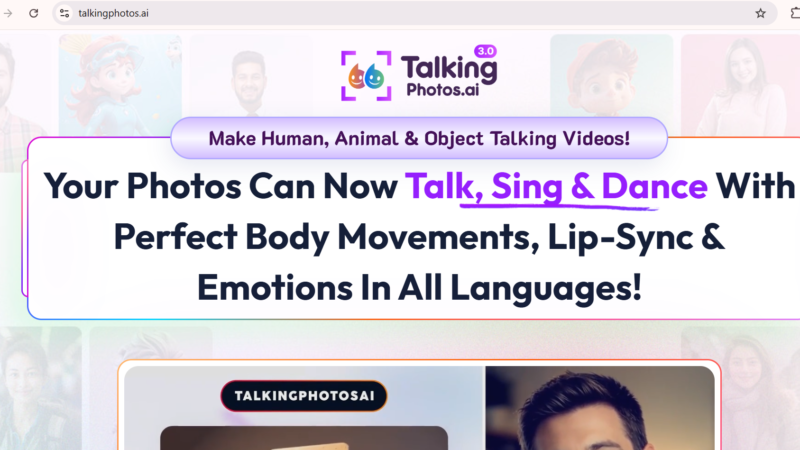
Quick Answer: TalkingPhotos AI is a cloud-based video creation tool that transforms any static photo into a lifelike talking, singing, or dancing video with accurate lip-sync, expressive facial movements, and multi-language voice support. In 2026, it offers a one-time payment model starting at $49 for the Basic plan and $97 for the All-Access plan no monthly fees, no subscriptions. TalkingPhotos AI is trusted by content creators, marketers, educators, and social media managers who need engaging video content without hiring actors or learning complex video editing software.
TalkingPhotos AI Review 2026: Can It Really Make Any Photo Talk, Sing, or Dance?
Updated: July 2026 | 11 min read | Toolszai Editorial Team — Tested hands-on
Video content dominates every platform in 2026 but producing it consistently is still slow, expensive, and technically demanding for most creators. Hiring a presenter costs money. Appearing on camera yourself takes time and confidence. Using stock footage feels generic and lifeless.
TalkingPhotos AI takes a different route. Instead of filming someone, you upload a photo any photo, human, cartoon, or animal and it generates a video where that character talks, sings, or dances with realistic lip-sync and natural facial expressions.
We tested TalkingPhotos AI extensively on the Basic and All-Access plans across different photo types and content styles. Here is the complete, honest verdict on what works, what does not, and whether the one-time price makes sense for your workflow.
⭐ Toolszai Quick Verdict TalkingPhotos AI 2026
Overall Rating: 8.0 / 10
Best for: Content creators, social media managers, marketers, educators, and small businesses who need engaging video content fast
Free plan: ✅ Limited free trial available
Pricing: One-time payment — Basic $49 (reg. $99) / All-Access $97 (reg. $169)
Money-back guarantee: ✅ 30 days
Biggest strength: Realistic lip-sync and one-time pricing — no recurring fees
Biggest limitation: Avatar facial accuracy trails HeyGen for photorealistic results. Rendering speed slows during peak hours.
Bottom line: The best value AI talking avatar tool available in 2026 for creators who want engaging video content without a monthly subscription.
What Is TalkingPhotos AI? A Simple Overview
TalkingPhotos AI is a cloud-based AI video creation platform that animates static images into talking, singing, or dancing video content. Unlike traditional video tools that require filming, it uses artificial intelligence to generate realistic facial movements, lip-sync, and body motion directly from a single photo input.
The platform supports human photos, cartoon characters, and animal images making it versatile enough for everything from professional marketing videos to creative social content and educational materials. Furthermore, it supports multi-language text-to-speech with emotional voice options, allowing creators to produce content for global audiences without recording separate voiceovers in each language.
What sets TalkingPhotos AI apart from competitors is its one-time payment model. The software offers unlimited video creation for a one-time payment, providing users with a blend of creativity and value unlike apps with steep monthly fees. For creators who produce high volumes of video content, this pricing structure offers a significantly lower long-term cost than subscription-based alternatives.
In plain English: You upload a photo, type what you want the character to say, choose a voice and language, and TalkingPhotos AI generates a video where that character speaks your script with realistic lip-sync in minutes, not hours.
TalkingPhotos AI Key Features in 2026 What Actually Works
Talking Photo Animate Any Image With Realistic Lip-Sync
The core feature is precisely what the name promises. You upload any photo a headshot, a cartoon character, a product mascot, even a pet and TalkingPhotos AI generates a video where that subject speaks your script with accurate lip-sync, natural head movements, and expressive facial animations.
Reviewers indicate the animations are smooth and engaging, particularly for human photos with clear, forward-facing expressions. In our testing, the lip-sync accuracy was impressive for standard speech at normal pace and noticeably better than most free or low-cost alternatives in this category. For unusual angles or obscured faces, however, the results required a second attempt with a better source image.
Singing and Dancing Videos
Beyond talking, TalkingPhotos AI animates characters to sing and dance synchronized to audio you provide or generate within the platform. This feature is particularly popular for social media content, birthday videos, promotional clips, and brand mascot content that needs energy and entertainment value rather than purely informational delivery.
Moreover, the platform supports both human and non-human subjects for singing and dancing meaning cartoon characters and animal photos produce equally entertaining results. Users report improved results creating short-form videos especially in singing and dancing scenarios.
Multi-Language Text-to-Speech 40+ Languages
TalkingPhotos offers versatile voice-over options including AI voices, text-to-speech, and custom audio uploads. Users think voice syncing is impressive and enjoy emotional voice choices. The platform supports over 40 languages with multiple voice styles including different tones, speeds, and emotional expressions making international content production practical without hiring voice actors in each language.
Additionally, the All-Access plan adds an in-app voice recorder and voice cloning capability, letting you replicate a specific voice or brand tone across all your video content consistently.
Text-to-Video Script to Animated Video
TalkingPhotos gives you a fast, intuitive way to turn written text into animated videos with talking avatars. Reviewers appreciate the creative freedom, multilingual support, and easy script-to-video workflow. Rather than starting from a photo, this workflow begins from a text script the AI selects or generates an appropriate avatar and animates it to deliver your content.
For content creators producing regular educational or informational videos, this text-to-video workflow removes the setup time that makes video production feel slow. Write the script, choose a style, and export the process takes minutes rather than hours.
Face Swap and AI Avatar Generator
TalkingPhotos AI includes face swap functionality that replaces an avatar’s face with a reference photo useful for creating personalized videos using a specific likeness. The AI avatar generator creates characters from text prompts if you do not have a suitable source image, giving you a starting point without any photography required.
However, it is worth noting one honest limitation here: the avatar creation capability struggles to generate an exact facial match, especially when compared to high-precision platforms like HeyGen. For brand-critical or client-facing work requiring photorealistic accuracy, this gap matters. For general content creation and social media, the quality is sufficient and fast.
Storyboard Tool Longer Video Productions
The storyboard tool sequences multiple animated clips into a longer production connecting scenes, adding transitions, and building narrative structure for videos that run beyond a single talking-head clip. The built-in creation workflow for producing longer sequences helps when building a series instead of one-off clips.
For educators building course content or brands creating multi-chapter explainer series, this storyboard capability makes TalkingPhotos AI more practical than single-clip tools at a similar price point.
Background Editor and Video Express Integration
The background editor replaces or blurs the original photo background with custom images, colors, or video backgrounds keeping the animated subject but giving you full control over the visual environment. Furthermore, the integration with VideoExpress streamlines the post-production workflow, making it easier to enhance and finalize animated videos without switching to a separate editing tool.
TalkingPhotos AI Pricing 2026 One-Time Payment Explained
TalkingPhotos AI uses a one-time payment model a significant differentiator from the subscription-based pricing of most AI video tools in 2026. Both plans include a 30-day money-back guarantee.
| Plan | Regular Price | Current Price | Key Features |
|---|---|---|---|
| Basic | $99 one-time | $49 one-time | Photo-to-video, talking/singing/dancing, AI avatar swap, text-to-speech, 40+ languages, unlimited videos, no watermark |
| All-Access | $169 one-time | $97 one-time | All Basic features + 5-minute video length, AI prompt extender, in-app voice recorder, voice cloning, storyboard tool, priority rendering |
The value comparison against subscription tools is compelling. Most reviewers consider the one-time payment model a major advantage, and they appreciate unlimited video generation and updates without extra charges. At $49 once versus $25 per month for comparable subscription tools, the Basic plan breaks even after two months and pays for itself significantly over a full year of content creation.
Nevertheless, always verify current pricing at the TalkingPhotos AI website before purchasing, as promotional prices can change. The 30-day money-back guarantee removes the risk from trying either plan.
TalkingPhotos AI Review: Honest Performance Ratings
| Category | Score | Notes |
|---|---|---|
| Lip-sync accuracy | 8.5 / 10 | Impressive for standard speech — best results with clear, forward-facing photos |
| Ease of use | 9.2 / 10 | Clean, intuitive interface — most users produce their first video in under 10 minutes |
| Voice quality | 8.0 / 10 | Strong AI voices with emotional range — voice cloning on All-Access adds significant value |
| Avatar realism | 7.2 / 10 | Good for general content — trails HeyGen for photorealistic precision |
| Value for money | 9.5 / 10 | One-time $49 with unlimited videos — outstanding ROI vs monthly competitors |
| Rendering speed | 7.0 / 10 | Fast for short clips — noticeably slower during peak hours for longer videos |
TalkingPhotos AI Pros and Cons
Like every tool, TalkingPhotos AI has genuine strengths and real limitations. Here is an honest breakdown before you commit.
| ✅ What Works Well | ❌ Where It Falls Short |
|---|---|
| One-time payment — no monthly fees, no subscriptions
Unlimited video creation on both plans Supports humans, cartoons, and animals equally Realistic lip-sync with smooth facial animations 40+ languages with emotional AI voice options Talking, singing, and dancing all in one platform Storyboard tool for multi-scene longer productions 30-day money-back guarantee — risk-free trial Regular updates included at no extra cost Clean, beginner-friendly interface |
Avatar facial accuracy trails HeyGen for photorealistic work
Rendering slows during peak hours for longer videos Limited pose and movement style options vs premium tools Voice cloning locked behind All-Access plan 5-minute maximum video length on All-Access only Quality depends heavily on input photo quality and angle No native mobile app — web-based only Occasional lip-sync artifacts on unusual face angles Limited advanced customization for branded avatar clothing and poses |
TalkingPhotos AI vs Alternatives Which Talking Avatar Tool Wins?
TalkingPhotos AI competes in a growing market of AI avatar and video tools. Before you decide, here is an honest comparison of the top alternatives in 2026.
| Tool | Best For | Price | vs TalkingPhotos AI |
|---|---|---|---|
| TalkingPhotos AI 🏆 | Creators wanting unlimited videos at one-time price | $49 one-time | Best value — unlimited videos, no monthly fees |
| HeyGen | Businesses needing photorealistic AI presenters | $29/month | More realistic avatars — significantly more expensive over time |
| D-ID | Teams needing API access and enterprise scale | From $5.9/month | API-first — better for developers, not casual creators |
| Synthesia | Corporate training and internal communication videos | $29/month | More polished enterprise output — TalkingPhotos far cheaper |
| JoyPix AI | Creators wanting talking avatars plus full video generation | Free / Credits | More video models — TalkingPhotos simpler and one-time paid |
Who Should Use TalkingPhotos AI in 2026?
| If you are… | TalkingPhotos AI is… | Why |
|---|---|---|
| A social media content creator | ✅ Excellent choice | Produce engaging videos daily without filming — unlimited at one price |
| A small business owner or marketer | ✅ Strong value at $49 | Product demos, brand mascots, and promos without hiring actors |
| An educator or course creator | ✅ Highly recommended | Multilingual talking avatar videos for lessons — no camera needed |
| A freelancer offering video services | ✅ High ROI at one-time price | Massive time savings and no recurring fees — high ROI for small teams |
| A brand needing photorealistic AI presenters | ⚠️ Consider HeyGen instead | HeyGen produces more precise facial matches for brand-critical work |
| A developer needing API integration | ❌ Use D-ID instead | TalkingPhotos has no public API — D-ID is built for programmatic access |
Frequently Asked Questions
What is TalkingPhotos AI and how does it work?
TalkingPhotos AI is a cloud-based platform that animates static photos into talking, singing, or dancing videos using artificial intelligence. You upload a photo, enter a script or audio, choose a voice and language, and the AI generates a video with realistic lip-sync and facial expression in minutes. It supports humans, cartoons, and animal photos equally making it versatile for social media, marketing, education, and entertainment content. The platform requires no video editing experience and produces export-ready MP4 files.
Is TalkingPhotos AI free to use?
TalkingPhotos AI offers a limited free trial that lets you test the core features before purchasing. Full access including unlimited video creation without watermarks requires a one-time paid plan. The Basic plan costs $49 (discounted from $99) and the All-Access plan costs $97 (discounted from $169). Both include a 30-day money-back guarantee, which effectively makes the purchase risk-free for anyone wanting to evaluate the full platform before committing.
How much does TalkingPhotos AI cost in 2026?
TalkingPhotos AI is available for a one-time payment of $49 (regular price $99) for the Basic plan, which includes photo-to-video technology, AI avatar swap, text-to-speech voices, and more. The All-Access plan costs $97 (regular price $169) and adds a 5-minute video length, AI prompt extender, in-app voice recorder, and more. There are no monthly fees both plans provide lifetime access. Always check the current price at the TalkingPhotos AI website before purchasing, as promotional pricing can change.
How does TalkingPhotos AI compare to HeyGen?
Both tools animate photos into talking videos, but they serve different needs. TalkingPhotos AI leads on value unlimited videos for a one-time payment of $49 versus HeyGen’s $29 per month subscription. HeyGen leads on photorealistic avatar precision it produces more accurate facial matches for professional and brand-critical work. For social media creators, educators, and small businesses producing high-volume content on a budget, TalkingPhotos AI is the stronger value. For enterprise brands needing the highest possible avatar realism, HeyGen justifies its premium pricing.
Can TalkingPhotos AI animate cartoon and animal photos?
Yes, TalkingPhotos AI supports not just human photos but also cartoon characters, illustrated avatars, and animal images. The talking, singing, and dancing animations work across all three categories, which makes it popular for brand mascot videos, animated explainer content, and entertainment-style social posts where a human face is not appropriate or desired. Results naturally vary based on the complexity and style of the source image, with clear, expressive cartoon faces producing the most consistent outputs.
Is there a mobile app for TalkingPhotos AI?
No, as of mid-2026, TalkingPhotos AI is a web-based platform without a dedicated native mobile app for iOS or Android. The web interface works on mobile browsers for basic tasks, but the full creation workflow particularly the storyboard tool and video editor is designed for desktop use. If a native mobile app is essential for your workflow, this is a genuine limitation worth factoring into your decision before purchasing.
Final Verdict Is TalkingPhotos AI Worth It in 2026?
TalkingPhotos AI delivers on its core promise better than almost any comparable tool at this price point. Uploading a photo and watching it speak your script with accurate lip-sync in under five minutes is still genuinely impressive and the unlimited video output at a one-time cost of $49 is a value proposition that no monthly subscription competitor can match for high-volume creators.
TalkingPhotos bridges the gap between speed and creativity. It gives small teams a way to produce video content at scale without adding to payroll or monthly software costs. For marketers, agencies, educators, and content creators juggling deadlines and budgets, that description captures the real-world value accurately.
The limitations are real and worth knowing in advance. Avatar facial precision trails HeyGen for photorealistic work. Rendering slows during peak hours for longer productions. Voice cloning and the storyboard tool require the All-Access plan. And the lack of a mobile app limits on-the-go use.
Nevertheless, for the majority of creators who need engaging video content produced quickly and affordably without filming, hiring, or managing complex video software TalkingPhotos AI in 2026 is the strongest value available in the talking avatar category.
✅ Toolszai Final Verdict TalkingPhotos AI: 8.0 / 10
Recommended for: Social media creators, small business owners, marketers, educators, course creators, and freelancers who produce regular video content and want unlimited output at a one-time price.
Not ideal for: Enterprise brands requiring photorealistic avatar precision (use HeyGen), developers needing API access (use D-ID), or users who need a native mobile app for on-the-go creation.
Best plan: Start with Basic at $49 the unlimited video creation alone justifies the price for any regular content creator. Upgrade to All-Access for voice cloning and the storyboard tool if you produce series or branded content at scale.