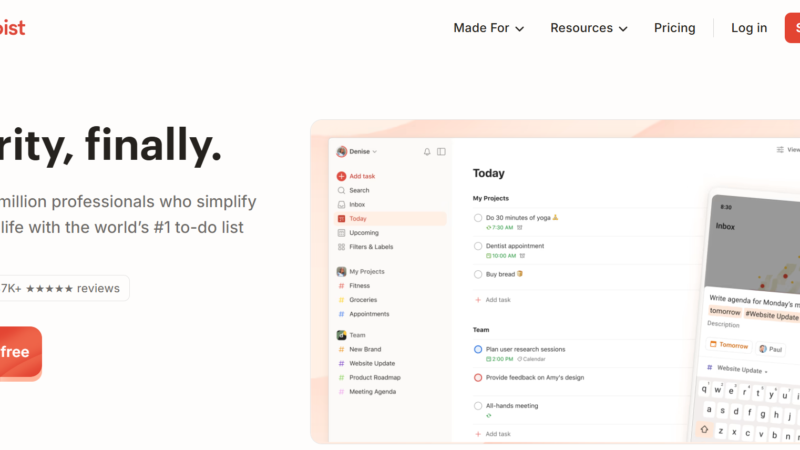
Quick Answer: Todoist AI is the artificial intelligence layer built into Todoist the world’s most popular task manager used by over 50 million people worldwide. In 2026, Todoist AI features include the AI Assistant for task breakdown and scheduling suggestions, Ramble for voice-to-task input powered by Google Gemini 2.5, and an official MCP server that connects Todoist to AI agents like Claude and ChatGPT. The free Beginner plan gives you basic task management, while the Pro plan at $4 per month (annual) unlocks all AI features. Todoist AI is best for individuals and teams who want reliable task management with AI assistance without switching to a complex new tool.
Todoist AI Review 2026: AI Assistant, MCP Integration, Pricing, and Is It Worth It?
Updated: July 2026 | 13 min read | Toolszai Editorial Team — Tested on Free and Pro Plans
Most people do not need a smarter task manager. They need to actually do their tasks. That sounds obvious but it explains why Todoist has outlasted hundreds of productivity app competitors since 2007. It does not try to reorganize your life. It just helps you get things done.
In 2026, however, Todoist made its boldest product move in years. The company added meaningful AI features a smart AI assistant, a voice-to-task tool powered by Google Gemini 2.5, and an official MCP server that lets AI agents like Claude and ChatGPT interact directly with your task list. Suddenly, Todoist is not just a to-do app anymore. It is an AI-powered productivity layer.
We tested every Todoist AI feature on both the free and Pro plans for two weeks capturing real tasks, running AI breakdowns, and connecting the MCP server to Claude. Here is the complete, honest picture of what works in 2026.
⭐ Toolszai Quick Verdict Todoist AI 2026
Overall Rating: 8.6 / 10
Best for: Individuals, freelancers, students, and teams who need a reliable task manager with practical AI assistance
Free plan: ✅ Yes, 5 active projects, basic task management, 10 Ramble sessions/month
AI features: Pro plan at $4/month (annual) AI Assistant, unlimited Ramble, full MCP access
Users worldwide: 50+ million
Biggest strength: AI that enhances the core product rather than replacing it natural language tasks, smart breakdowns, voice input, and AI agent integration
Biggest limitation: Free plan limits push users toward Pro faster than expected. No Gantt charts or time tracking even on paid plans.
Bottom line: The best AI-enhanced task manager for users who want power without complexity. At $4/month, the Pro plan is one of the strongest value deals in productivity software.
What Is Todoist AI? A Simple Overview
Todoist is a cross-platform task management application developed by Doist, a fully remote company founded by Amir Salihefendić in 2007. Over nearly two decades, it grew from a simple to-do list into one of the most sophisticated task managers available while keeping the interface clean enough that anyone can use it on day one.
In 2026, Doist Todoist AI refers specifically to the artificial intelligence layer built on top of the core product. Rather than rebuilding Todoist from scratch as an “AI-native” tool, Doist took a deliberate approach: add AI where it genuinely helps, without disrupting what already works. The result is a task manager that feels familiar to existing users while delivering meaningful new capabilities through the Todoist AI assistant, Ramble voice input, and MCP server integration.
Importantly, the Todoist AI features are not available on the free Beginner plan beyond a limited number of Ramble sessions. Full access to the Todoist AI assistant and unlimited Ramble requires upgrading to Pro. Nevertheless, even the free plan delivers a task management experience that many users find sufficient for personal use.
In plain English: Todoist is your task manager. Todoist AI is the smart layer on top it breaks complex tasks into subtasks, suggests priorities and deadlines, converts your voice notes into organized task lists, and now connects directly to AI agents like Claude so they can manage your tasks on your behalf.
Todoist AI Features in 2026 What Actually Works
Todoist AI Assistant Smart Task Breakdown and Scheduling
The Todoist AI assistant is the core AI feature available on the Pro plan. It does three things particularly well in 2026: breaking complex tasks into actionable subtasks, suggesting optimal due dates based on your current workload, and providing weekly productivity insights.
For example, typing “plan the Q3 product launch” into Todoist with the AI assistant enabled produces a structured list of subtasks market research, stakeholder review, content calendar, launch assets, distribution plan each with suggested deadlines based on your calendar. In our testing, the breakdown accuracy was genuinely impressive for project planning tasks. For simple personal tasks, however, the AI suggestions felt unnecessary.
Furthermore, the Todoist AI assistant analyzes your task completion patterns over time and adjusts its scheduling suggestions based on your actual habits. If you consistently complete tasks in the morning, the AI starts suggesting morning deadlines for high-priority items. This personalization improves noticeably after two to three weeks of use.
Todoist AI Integration Ramble Voice-to-Task Input
Ramble is Todoist’s most exciting new AI integration feature, launched January 21, 2026. It converts natural speech including unstructured thoughts, meeting recaps, and stream-of-consciousness dumps into organized, actionable tasks complete with projects, due dates, priorities, and labels.
Ramble runs on Google Gemini 2.5 Flash Live via Vertex AI and supports 38 languages. The practical workflow is simple: open Todoist, tap the Ramble button, speak naturally for up to two minutes, and watch the AI parse your words into a structured task list. For example, saying “I need to follow up with the client about the contract, send the invoice by Friday, and schedule a team review for next week” produces three separate tasks with appropriate deadlines and project assignments automatically.
In our testing, Ramble’s accuracy was remarkably high around 90% of the tasks it created matched what we intended to capture. Moreover, it handles ambiguity well, asking clarifying questions when a deadline or project assignment is unclear rather than guessing incorrectly. Free users get 10 Ramble sessions per month. Pro users get unlimited sessions.
Todoist AI MCP Connect Your Task Manager to AI Agents
This is the feature that makes Todoist genuinely exciting for developers and power users in 2026. Doist maintains an official first-party MCP server for Todoist one of the most reliable and full-featured MCP implementations available for any task management tool.
The Todoist AI MCP server covers essentially the complete Todoist API: tasks, projects, sections, labels, comments, collaborators, and even productivity statistics. Through the MCP connection, AI agents like Claude, ChatGPT, Cursor, and Claude Code can read your tasks, create new ones, update deadlines, mark completions, add comments, and reorganize projects all through natural language conversation.
In practice, this means you can tell Claude: “Create a high-priority task to submit the quarterly report by Friday in my Work project” and Todoist updates instantly without you opening the app. Alternatively, you can ask: “What are my overdue tasks this week?” and get a structured summary pulled directly from your Todoist account. The Todoist MCP integration with Claude works through Claude.ai’s connectors or Claude Desktop with no API keys or terminal setup required for basic use.
Todoist AI Agent Support Automate Your Task Workflow
Beyond the official MCP server, Todoist AI agent integration extends further through third-party platforms. Composio’s Todoist MCP server offers a Tool Router that lets AI agents dynamically load Todoist tools alongside tools from other apps creating multi-app AI workflows through a single MCP endpoint. Zapier’s Todoist MCP enables no-code AI automation connecting Todoist to hundreds of other applications.
For developers building AI agents with frameworks like the Claude Agent SDK or OpenAI Agents SDK, Composio provides pre-built Todoist integrations with built-in OAuth handling, per-user credential management, and comprehensive audit logging. As a result, building a custom AI agent that manages your Todoist account is now a realistic weekend project rather than a complex engineering undertaking.
Natural Language Task Input The Original AI Feature
Before the AI assistant and Ramble arrived, Todoist’s natural language parser was already one of its most loved features. Type “Call client every Monday at 9am” and Todoist automatically sets the time, recurrence pattern, and priority. Type “Submit report next Friday p1” and Todoist parses the deadline and priority level simultaneously.
In 2026, this natural language parsing has become even more accurate handling more complex date expressions, timezone-aware scheduling, and multi-language input across all platforms. For new users, this feature alone makes Todoist feel substantially smarter than competitors.
Productivity Insights and Workload Balancing
The Todoist AI assistant also surfaces weekly productivity insights task completion rates, productivity trends by day and time, and workload distribution across projects. Additionally, it identifies when your task load for a given day looks unrealistic and proactively suggests redistributing tasks to maintain a sustainable pace.
For users prone to over-scheduling themselves, this workload balancing feature is genuinely valuable. It surfaces the problem before you feel it on a stressed Thursday afternoon.
Todoist AI Pricing 2026 Every Plan Explained
Todoist raised prices in December 2025 the first price increase since 2022. Annual billing saves approximately 20% across paid plans. Here is the complete breakdown for 2026.
| Plan | Price (Annual) | Price (Monthly) | Key Features |
|---|---|---|---|
| Beginner (Free) | $0 forever | $0 | 5 active projects, 300 tasks/project, 3 filters, 10 Ramble sessions/month, natural language input |
| Pro | $4/month ($48/year) | $5/month | 300 projects, unlimited reminders, AI Assistant, unlimited Ramble, calendar view, deadlines, 150 filters, automatic backups |
| Business | $6/user/month (annual) | $8/user/month | Team workspace, 500 team projects, team roles and permissions, admin controls, centralized billing, all Pro features |
Is the Todoist AI Free Plan Worth It?
The free Beginner plan is genuinely functional for personal task management. Five active projects, 300 tasks per project, and 10 Ramble sessions per month cover most casual users’ needs. However, the absence of reminders on the free plan is the most commonly cited frustration without reminders, tasks get missed.
Therefore, the honest recommendation is this: use the free plan until you hit the five-project ceiling or find yourself wishing for reminders. That moment which most regular users reach within 30 to 60 days is when upgrading to Pro becomes an obvious decision.
Is the Todoist Pro Plan Worth $48 Per Year?
For most users, yes. According to independent testing, Todoist Pro pays for itself if you manage eight or more active projects or use the AI assistant five or more times per week. At $48 per year, the break-even is roughly one hour of saved time per month. Most regular users report two to four hours saved monthly through reminders and AI workflows alone making Pro a clear positive return on investment for anyone who uses Todoist daily.
Todoist AI Review: Honest Performance Ratings
| Category | Score | Notes |
|---|---|---|
| AI assistant quality | 8.5 / 10 | Task breakdown and scheduling suggestions genuinely useful |
| Ramble voice input | 9.0 / 10 | 90% accuracy best voice-to-task feature we have tested |
| MCP integration quality | 9.2 / 10 | Official first-party MCP most reliable task manager AI agent integration |
| Ease of use | 9.5 / 10 | Best-in-class simplicity powerful without overwhelming users |
| Value for money | 9.3 / 10 | $4/month annual is among the best deals in productivity software |
| Cross-platform availability | 9.8 / 10 | Web, iOS, Android, macOS, Windows, Linux, Apple Watch, Wear OS |
Todoist AI Pros and Cons
Like every tool, Todoist AI has genuine strengths and real limitations. Here is an honest breakdown before you commit.
| ✅ What Works Well | ❌ Where It Falls Short |
|---|---|
| Official MCP server best AI agent integration for any task manager
Ramble voice-to-task powered by Google Gemini 2.5 38 languages AI assistant breaks complex tasks into actionable subtasks Natural language task input fastest capture experience available Pro plan at $4/month is one of the best productivity deals in 2026 Available on 8 platforms including Apple Watch and Wear OS 50+ million users trusted, stable, and actively developed Free plan functional for personal use with 10 Ramble sessions/month G2 rating of 4.5/5 consistently strong user satisfaction 38-language support across all AI features |
No reminders on free plan most frustrating free-tier limitation
No Gantt charts or timeline views not a full project manager No time tracking built in requires third-party integration December 2025 price increase frustrated long-time users Free plan limited to 5 active projects fills up quickly AI assistant generic for very niche or technical project types No built-in calendar relies on Google Calendar or Outlook integration Workload views and dependencies require ClickUp or Asana instead MCP server setup requires some technical familiarity for advanced use |
Todoist AI vs Alternatives Which Task Manager Wins in 2026?
Todoist operates in a competitive market. Several strong Todoist alternatives tackle task management and AI integration differently. Here is how they compare honestly.
| Tool | Best For | Starting Price | vs Todoist AI |
|---|---|---|---|
| Todoist AI 🏆 | Individuals and teams wanting power without complexity | Free / $4/month | Best balance of simplicity, AI features, and MCP agent support |
| TickTick | Users wanting more features at lower or no cost | Free / $2.79/month | Cheaper includes built-in calendar and habits. Less polished AI. |
| Notion AI | Teams needing tasks, docs, databases, and wikis together | Free / $10 AI add-on | More powerful for teams more complex to set up and maintain |
| ClickUp | Teams needing Gantt, time tracking, and workload views | Free / $7/user/month | Far more features significantly more complex. Todoist is simpler. |
| Reclaim AI | Professionals wanting AI calendar and task scheduling | Free / $10/user/month | Stronger at calendar auto-scheduling — works well alongside Todoist |
| Microsoft To Do | Microsoft 365 users wanting free task management | Free (included in M365) | Free for M365 users fewer AI features and less capable than Todoist |
Who Should Use Todoist AI in 2026?
Not every user gets the same value from Todoist AI. Here is an honest breakdown based on actual use cases.
| If you are… | Todoist AI is… | Why |
|---|---|---|
| A freelancer or solo professional | ✅ Best choice at $4/month | AI assistant + Ramble + MCP deliver real productivity gains at minimal cost |
| A student managing coursework | ✅ Start with the free plan | 5 projects and 10 Ramble sessions cover most student task needs |
| A developer building AI agents | ✅ Excellent MCP integration | Official first-party MCP server most reliable and full-featured available |
| A small team needing collaboration | ✅ Business plan at $6/user | Shared projects, team roles, and all AI features at a competitive price |
| Someone wanting Gantt charts or timelines | ❌ Use ClickUp instead | Todoist does not offer Gantt charts or project timeline views |
| A team needing time tracking | ⚠️ Pair with Toggl or Harvest | Todoist has no native time tracking needs third-party integration |
| A Claude or ChatGPT power user | ✅ Perfect MCP fit | Tell Claude to manage your tasks Todoist MCP makes it seamless |
Frequently Asked Questions
What is the Todoist AI assistant and how does it work?
The Todoist AI assistant is a Pro plan feature that analyzes your tasks and provides three types of help: breaking complex tasks into actionable subtasks, suggesting optimal due dates based on your current workload and completion patterns, and surfacing weekly productivity insights. It works by analyzing the tasks you type, your completion history, and your project structure then making context-aware suggestions that improve as you use Todoist more consistently. The AI assistant does not require any setup it activates automatically when you upgrade to Pro.
Is Todoist AI free?
Partially. The free Beginner plan includes 10 Ramble voice-to-task sessions per month and access to Todoist’s natural language task parsing both of which use AI. However, the full Todoist AI assistant, unlimited Ramble sessions, reminders, calendar view, and 300 projects require the Pro plan at $4 per month billed annually ($48 per year). For most serious users, the free plan’s limits become apparent within 30 to 60 days, making the Pro upgrade an obvious decision.
What is the Todoist AI MCP server and how do I use it?
The Todoist AI MCP server is Doist’s official implementation of the Model Context Protocol a standard that lets AI agents like Claude and ChatGPT connect directly to your Todoist account. Through the MCP connection, AI agents can create tasks, update deadlines, mark completions, add comments, and query your task list using natural language. For basic use through Claude.ai or Claude Desktop, setup requires no API keys or terminal commands just authenticate your Todoist account through the connector. For advanced AI agent development using Claude Agent SDK or OpenAI Agents SDK, Composio provides managed MCP integration with full OAuth handling and audit logging.
What is Todoist Ramble and is it worth using?
Todoist Ramble is a voice-to-task feature launched January 21, 2026, powered by Google Gemini 2.5 Flash Live. You speak naturally describing tasks, meeting recaps, or unstructured thoughts and Ramble converts your words into organized, labeled, and prioritized tasks with correct project assignments and due dates. In our testing, Ramble achieved approximately 90% accuracy across a variety of input styles. It supports 38 languages. Free users get 10 sessions per month; Pro users get unlimited access. For professionals who think faster than they type, Ramble is one of the most practically useful AI productivity features released in 2026.
What are the best Todoist alternatives in 2026?
The best Todoist alternative depends entirely on what you need most. Budget-conscious users will find TickTick compelling — it starts at $2.79 per month and includes a built-in calendar, habit tracker, and Pomodoro timer. Teams that need Gantt charts and time tracking should look at ClickUp, which offers a generous free plan alongside powerful project management tools. Reclaim AI is the strongest option for AI-powered calendar scheduling, as it connects directly to Todoist via integration and auto-schedules your tasks on your calendar. Finally, anyone wanting an all-in-one workspace with tasks, documents, and databases will find Notion AI the more feature-complete option — though it comes with greater setup complexity.
How does the Todoist AI agent integration work with Claude?
Connecting Claude to Todoist through the official MCP server takes under five minutes for basic setup. Through Claude.ai’s connectors menu, you add the Todoist connector and authenticate with your Todoist account. Once connected, you can use natural language in Claude to manage your tasks creating new ones, asking for summaries, updating deadlines, or reorganizing projects. For example, asking Claude “What tasks are due this week?” returns a live list pulled directly from your Todoist account. For developers, Composio’s Todoist MCP implementation adds structured tool calling, RBAC permissions, audit logging, and multi-user credential management for production AI agent deployments.
Is Todoist worth it after the December 2025 price increase?
Yes, even after the price increase, Todoist Pro at $4 per month annually remains one of the best value deals in productivity software. The increase funded the development of Ramble and expanded AI assistant capabilities, both of which deliver genuine value. For comparison, ClickUp’s equivalent tier costs $7 per user per month, Notion AI adds $10 per month on top of an existing plan, and Reclaim AI starts at $10 per user per month. At $48 per year for the full feature set including MCP, AI assistant, and unlimited Ramble, Todoist Pro undercuts most competitors significantly.
Final Verdict Is Todoist AI Worth It in 2026?
After two weeks of hands-on testing across the free and Pro plans, Todoist AI earns its position as the best AI-enhanced task manager for most individuals and small teams in 2026.
The combination of features is genuinely compelling: Ramble makes task capture faster than any competitor’s solution, the AI assistant delivers practical time savings for project planning, and the official MCP server makes Todoist the most AI-agent-ready task manager available enabling Claude, ChatGPT, and other AI tools to manage your tasks directly through natural language.
Furthermore, at $4 per month on the annual plan, Pro delivers more genuine value than almost any competing productivity tool. The break-even is roughly one hour of saved time per month a threshold that most regular users pass in the first week of enabling reminders and AI features alone.
The limitations are real but predictable: no Gantt charts, no built-in time tracking, and a free plan that pushes users toward Pro faster than it used to. For teams that need full project management with dependencies and workload views, ClickUp or Notion is the better choice. For individuals and teams who simply want to get things done reliably with AI that helps rather than complicates Todoist in 2026 remains the benchmark.
✅ Toolszai Final Verdict Todoist AI: 8.6 / 10
Recommended for: Freelancers, students, knowledge workers, developers building AI agents, small teams, and anyone who wants the most capable AI-enhanced task manager at the best price in 2026.
Not ideal for: Teams needing Gantt charts, time tracking, or complex project dependencies. Users who need an all-in-one workspace with docs and databases (use Notion instead).
Best plan: Pro at $4/month annual one of the best value deals in productivity software. Do not upgrade in your first 30 days. Use the free plan until you genuinely hit its limits.
👉 Mem AI Review 2026 — Best AI Note-Taking App for Knowledge Workers